Terms of Service
Last updated: August 28, 2026
Acceptance of Terms
By accessing or using linkoteka.com (the "Service") operated by Linkoteka ("we," "us," or "our"), you agree to be bound by these Terms of Service. If you disagree with any part of these terms, you may not access the Service.
Description of Service
Linkoteka provides a personal bookmark management service through our website and our browser extensions. The Service is offered on a free plan and on a paid Pro subscription. We reserve the right to modify, suspend, or discontinue the Service at any time with or without notice.
User Accounts
When you create an account with us, you must provide accurate, complete, and current information. You are responsible for:
- Maintaining the confidentiality of your account credentials
- All activities that occur under your account
- Notifying us immediately of any unauthorized use of your account
We reserve the right to terminate accounts that violate these Terms.
Age Requirements
You must be at least 13 years old to use this Service. By using the Service, you represent that you meet this age requirement.
Plans, Limits and Advertising
The free plan allows up to 500 bookmarks across unlimited topics and workspaces, and is supported by advertising that we display within the Service. Pro removes the bookmark limit and the advertising, and adds full-text search across the pages you have saved. We may change plan limits and features, and will give reasonable notice of changes that materially reduce what your current plan includes.
If you reach the free plan limit you can no longer add new bookmarks, but your existing bookmarks remain accessible and exportable. If a Pro subscription ends while you are over the free limit, your bookmarks are never deleted for that reason — you simply cannot add more until you are back under the limit or subscribe again.
Payment Terms
Pro costs $3 per month or $24 per year. Subscriptions are billed in advance and renew automatically until cancelled. Payments are processed by Lemon Squeezy, which acts as the merchant of record and handles billing and any applicable sales tax or VAT; we never receive or store your card details.
You may cancel at any time from your account settings. Cancellation stops future renewals and your Pro features remain active until the end of the period you have already paid for. Except where required by law, fees already paid are non-refundable and we do not refund partial periods. We may change pricing with 30 days' notice, which will not affect a period you have already paid for.
Your Content
The bookmarks, titles, notes, tags, topics, and workspaces you create remain yours. You grant us only the limited, non-exclusive licence needed to operate the Service for you — to store your content, back it up, index it so you can search it, and display it back to you and to anyone you deliberately share it with. We do not use your notes or your private bookmarks to build public listings, and we do not sell them.
You are responsible for the content you save, and you confirm you have the right to store it. We may remove content that violates these Terms or applicable law.
Intellectual Property
The Service itself — its software, design, name, and logo — and all original content, features, and functionality are the exclusive property of Linkoteka and its licensors, and may not be copied or reused without permission.
Prohibited Uses
You agree not to use the Service to violate applicable laws, transmit spam, impersonate any person, restrict others' use of the Service, gain unauthorized access to any part of the Service, use automated scripts to collect information or place unreasonable load on our infrastructure, resell or redistribute the Service, or upload viruses or malicious code.
Third-Party Sites and Content
Bookmarks point to websites we neither own nor control. We fetch publicly available information about the pages you save — such as the title, description, icon, and page text — to power titles, recommendations, and search, and we periodically check whether your links still work. For a link that has died, the Service can look the address up in the Internet Archive and open the closest saved copy. We do not endorse third-party sites and are not responsible for their content, availability, or terms.
Availability, Backups and Export
We take reasonable care to keep the Service running and to back up your data, but we do not guarantee uninterrupted availability or that no data will ever be lost. Export is free on every plan and has no limit — we recommend keeping your own copy of anything you cannot afford to lose.
Termination
You may stop using the Service and request deletion of your account at any time by contacting us; deletion removes your account and the bookmarks, topics, and workspaces attached to it. We may suspend or terminate an account that breaches these Terms. Sections that by their nature should survive termination — including content ownership, disclaimers, limitation of liability, and governing law — continue to apply.
Disclaimer of Warranties
The Service is provided on an "AS IS" and "AS AVAILABLE" basis without warranties of any kind. We do not warrant that the Service will function uninterrupted or error-free, that defects will be corrected, or that the Service is free of harmful components.
Limitation of Liability
To the maximum extent permitted by applicable law, Linkoteka shall not be liable for any indirect, incidental, special, consequential, or punitive damages, including loss of data or profits. In no event shall Linkoteka's total liability exceed the greater of $100 or the amounts paid by you to Linkoteka in the past twelve months.
Governing Law
These Terms shall be governed by the laws of Costa Rica. Disputes will be resolved through binding arbitration in Costa Rica, except that either party may seek injunctive relief in any court of competent jurisdiction. Nothing here removes any consumer right you have under the mandatory law of your own country of residence.
Changes to Terms
We reserve the right to modify these Terms at any time. Your continued use of the Service after changes are posted constitutes acceptance of the revised Terms.
Contact Us
If you have questions about these Terms, please contact us at info@linkoteka.com.
Privacy Policy
Last updated: September 14, 2026
Introduction
This Privacy Policy describes how Linkoteka ("we," "us," or "our") collects, uses, and shares information about you when you use our Service. By using our Service, you agree to the collection and use of information in accordance with this policy.
Information We Collect
- Information you provide directly: Name, email address, your bookmarks and everything you write on them (titles, notes, tags, topic and workspace names), and — optionally — your age range and gender
- Information collected automatically: IP address, browser type, operating system, device type, preferred language, timezone, approximate location (country, derived from your IP), and referring URLs
- Usage information: When you sign in, how often a bookmark is opened, and which advertisements are shown to you or clicked
- Page information: Publicly available data about the pages you save — title, description, icon, keywords, and page text — which we fetch from those pages to power titles, recommendations, link-health checks, and Pro full-text search
- Information from third-party services: If you sign in with Google or GitHub, we receive your email address and basic profile information from that provider
You can review, change, or delete the optional and automatically detected personalisation data, and opt out of its collection, at any time in your account settings.
Your Bookmarks Are Private
Your bookmarks, notes, topics, and workspaces are visible only to you. No other user can read them, and we do not publish them.
Separately, we keep a shared catalogue of web pages: the address of a page saved by anyone, together with the public information we fetch about it. Catalogue entries record the page, not the person — they are not linked to you or to your account — and they are what allow us to recommend pages to other users. If you would rather a particular link never enter the catalogue, do not save it to the Service.
Demo Sessions
You can try Linkoteka without an account. A demo session is anonymous: it has no name or email address, only a random identifier, and holds a private copy of a sample board that no one else can see.
During a demo we collect no personalisation data (no browser, device, country, language or timezone), show no advertisements, and do not record your activity. Our servers do not fetch or check links you add in a demo. The site's Google Analytics measurement described below applies as it does to any visitor.
A demo board and everything on it is deleted about 24 hours after the session starts. Links first added in a demo are removed from our catalogue at the same time, unless someone with an account has saved them too. If you choose Keep this board, the session becomes an ordinary account and this policy applies to it in full.
How We Use Your Information
We use the information we collect to provide, operate, and maintain our Service; to authenticate you and keep your account secure; to improve and personalise your experience, including tailoring bookmark recommendations and the advertising shown to you; to communicate with you; to process transactions; to send technical notices and security alerts; and to comply with legal obligations.
How We Share Your Information
- Payments: Lemon Squeezy processes Pro subscriptions as merchant of record and receives the billing details you give it. We never receive or store your card details.
- Analytics: We use Google Analytics to understand how the site is used in aggregate.
- Service providers: Other vendors who provide hosting, email delivery, and similar services on our behalf, limited to what they need to perform them.
- Search partners: To find new recommendations we may send generic topic and tag words — never your identity or your bookmark list — to the Brave Search API.
- Legal requirements: We may disclose information if required by law or in response to valid legal processes.
- Business transfers: We may share information in connection with a merger, acquisition, or sale of assets.
We do not sell your personal information, and we do not share it with third parties for their own marketing purposes.
Advertising
The free plan is supported by advertising that we serve ourselves — no third-party ad network sits between us and you, and no advertiser receives your personal information. We may choose which advertisement to show using the personalisation data described above, and we record views and clicks so we can report performance to advertisers in aggregate. Turning off personalisation in your account settings, or subscribing to Pro, stops this.
Cookies and Similar Technologies
We keep you signed in with a token stored in your browser's local storage, and we store preferences such as your theme choice on your device. Our website also loads Google Analytics, which sets its own cookies to measure site usage. You can instruct your browser to refuse cookies, though signing in requires the storage we use for your session.
Requests Your Browser Makes
When you use Find archived copy on a dead link, your browser asks the Internet Archive whether it holds a snapshot of that address; the request goes directly from your browser to archive.org and is subject to their privacy policy. Bookmark icons are likewise loaded from the sites they belong to.
Data Retention
We retain your personal information for as long as your account is active or as needed to provide the Service. When you delete your account we remove your personal data and your bookmarks; entries already in the shared page catalogue, which are not linked to you, remain. We may keep limited records where the law requires it. When we no longer need to retain information, we securely delete or anonymise it.
Your Rights
You can, at any time:
- Access and correct your profile from your account settings
- Export all of your bookmarks, free and without limit, in HTML or JSON
- Delete your optional and detected personalisation data, or opt out of personalisation entirely
- Request deletion of your account and the data attached to it by writing to us
Depending on where you live, you may have further rights over your personal data — including objecting to certain processing or lodging a complaint with your local data protection authority. Write to info@linkoteka.com and we will help.
Children's Privacy
Our Service is not directed to children under 13. We do not knowingly collect personal information from children under 13. If you believe your child has provided us with personal information, please contact us at info@linkoteka.com.
Data Security
We implement appropriate technical and organisational security measures to protect your personal information: traffic is encrypted in transit, passwords are stored only as salted hashes, and the database enforces per-user access on every request. However, no method of transmission over the internet is 100% secure.
Third-Party Links
Our Service is built around links to third-party websites. We have no control over and assume no responsibility for the content or privacy policies of any third-party sites.
Changes to This Privacy Policy
We may update our Privacy Policy from time to time. We will notify you of any changes by posting the new Privacy Policy on this page and updating the "Last updated" date.
Contact Us
If you have questions about this Privacy Policy, contact us at info@linkoteka.com.
User Guide
Signing in
Create an account with your email and a password, or sign in with Google or GitHub in one click. New email accounts receive a verification link — confirm it to secure your account. Forgot your password? Use the Forgot password? link on the sign-in screen to receive a reset email.
Bookmarks
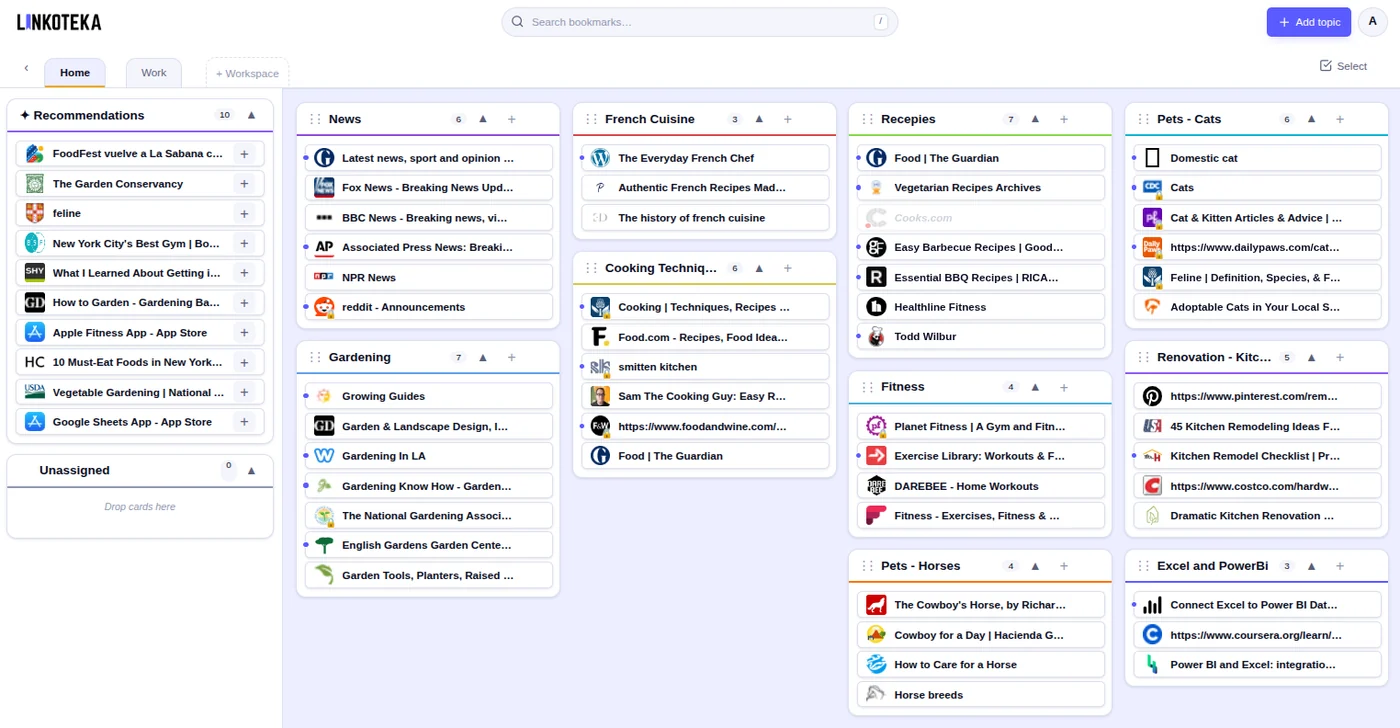
Adding a bookmark: Click + Add topic to create a topic first, then click the + button inside the topic header. Enter the URL and the app fetches the title automatically. You can also add notes and tags.
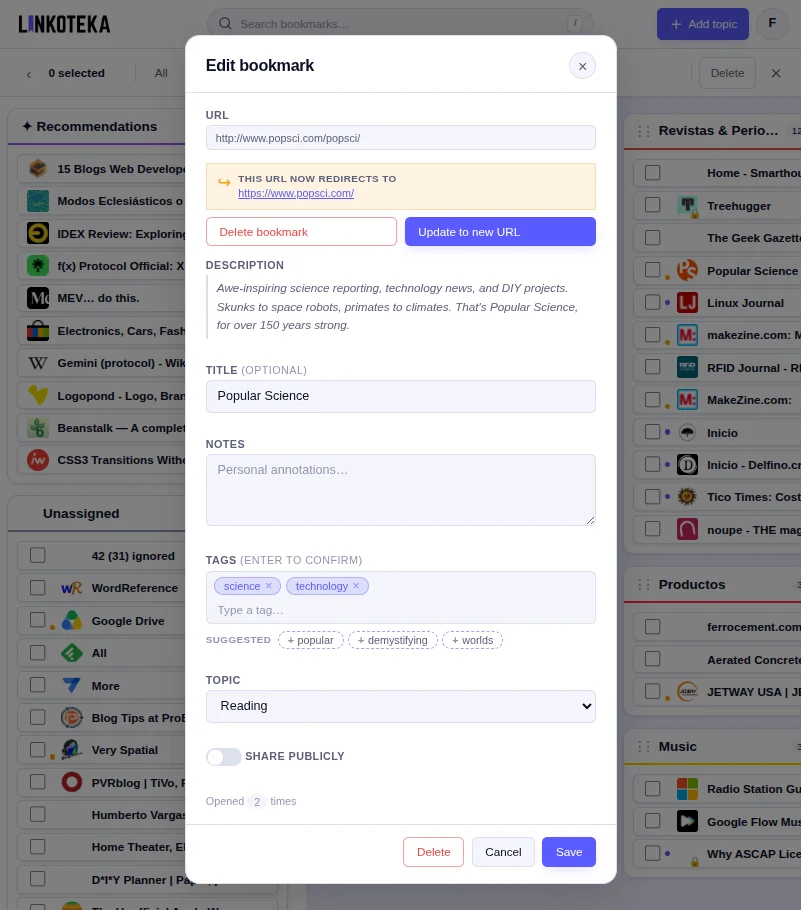
Editing a bookmark: Click on any bookmark card to open the edit dialog. You can change the title, notes, topic, tags, and public status.
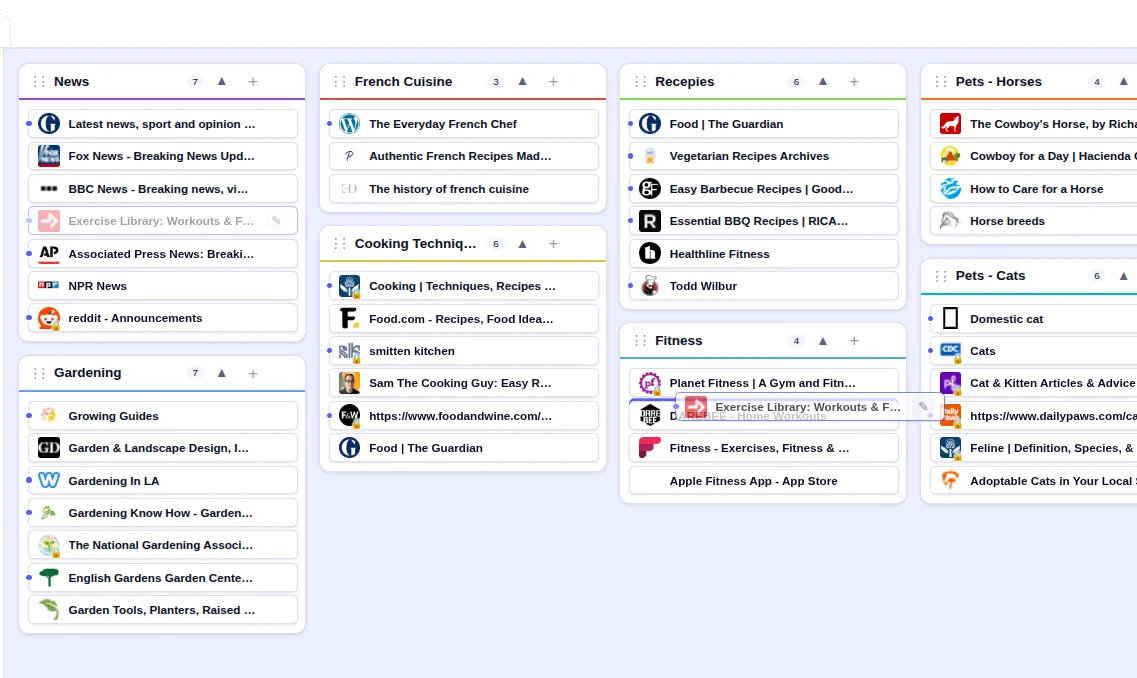
Moving within a topic: Drag a bookmark card up or down within its topic column to reorder it.
Moving to a different topic: Either drag the card and drop it onto another topic column, or open the bookmark's edit dialog and change the Topic dropdown.
Deleting a bookmark: Open the bookmark's edit dialog and click Delete.
Share publicly: The toggle in the edit dialog marks a bookmark as one you're happy to share. Marked bookmarks get a small dot on the card and are flagged as public in an HTML export, so browsers and other tools treat them as shareable. Everything in your board stays visible only to you either way — nothing you save is published to other Linkoteka users.
Topics
Adding a topic: Click the + Add topic button in the app bar (top right). Give it a name and choose a colour.
Editing a topic: Click the pencil icon in the topic header to rename it or change its colour.
Reordering topics: Drag a topic header left or right to change its position on the board.
Collapsing a topic: Click the arrow (▲) in the topic header to collapse or expand it.
Deleting a topic: Open the topic's edit dialog and click Delete. All bookmarks in the topic will be unassigned.
Single-site containers
A single-site container is a topic tied to one website — for example a YouTube or Medium container. When editing a topic, enter that site's domain (e.g. youtube.com) in the Site domain field; the app checks that the domain exists before saving.
From then on, whenever you save a link from that site, a pre-ticked "Also save to [container]" option appears, so the bookmark lands in both the topic you chose and the matching container. Containers have a fully-coloured header so they're easy to spot.
Recommendations & unassigned bookmarks
The left-hand panel holds two special containers. Recommendations surfaces links from the shared catalogue that match your tags and topic names, refreshed daily — open one's edit dialog and choose Adopt to add it to your own collection. The Unassigned tray collects bookmarks that aren't in any topic yet; drag them onto a topic when you're ready.
Dead, restricted & moved links
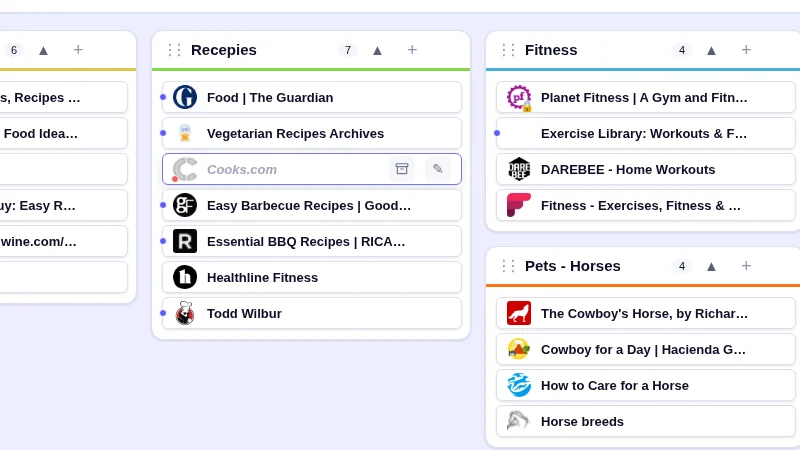
Linkoteka checks your links periodically. A bookmark that can no longer be reached is shown dimmed — use Hide dead in batch mode to tuck these away. A bookmark behind a login or paywall shows a lock badge ("login required") and stays fully visible, since it still works once you're signed in. If a link permanently redirects elsewhere, a small orange dot appears on its favicon; open the bookmark to Update to the new URL or delete it. Dead bookmarks also offer Find archived copy — on the card and in its edit dialog — which looks the original address up in the Internet Archive and opens the closest saved snapshot in a new tab, or tells you if there isn't one. Links behind a login don't offer it: they aren't broken, so there is nothing to recover.
Browser extensions
The Chrome extension and Firefox add-on put Linkoteka one click away. Sign in once in the popup — with your email, Google, or GitHub — and it stays signed in.
Bookmark Current Page grabs the tab you're on with its title, description and icon, and lets you add notes and tags and pick any topic from any workspace before saving (leave it on — Unassigned — to sort it out later). Single-site containers work here too, with the same "Also save to…" option.
Import Chrome Bookmarks reads your browser's bookmarks directly, with no file export in between: it shows you how many topics and links it found and how many are duplicates, you choose the destination workspace, and it imports. There's also Set as Homepage if you'd like Linkoteka to open with every new window.
The extension only reads a tab when you ask it to — it doesn't follow your browsing. On Safari, export your bookmarks to an HTML file and import them here instead.
Themes
Toggle between the Light and Dark themes from the Theme row in the account menu (the round avatar button at the top right). Your choice is remembered on this device.
Your account & privacy
Open Account settings from the account menu (the round avatar button at the top right) to update your profile. You can optionally share your age range and gender, and review what we detect automatically at sign-in (country, browser, and device), to get more relevant recommendations and banners. You can change or delete this information — or opt out of personalisation entirely — at any time from the same screen.
Plans & billing
The Free plan holds up to 500 bookmarks across unlimited topics and workspaces, and is supported by occasional ads. A meter appears in the sidebar once you pass 80% of the limit so the ceiling never takes you by surprise.
Pro costs $3/month or $24/year and lifts the limit entirely, searches inside the pages you've saved, and removes the ads. Upgrade from Account settings; checkout is handled by Lemon Squeezy, and you can manage or cancel the subscription from the same screen at any time. Cancelling keeps Pro running until the end of the period you've paid for, and your bookmarks are never deleted for going back over the free limit — you simply can't add new ones until you're under it again.
Workspaces
Workspaces let you maintain separate boards — for example one for personal use and one for work. Each workspace has its own set of topics and bookmarks.
Adding a workspace: Click + Workspace in the tab bar at the top. Give it a name.
Switching workspaces: Click any workspace tab at the top of the screen.
Editing or deleting a workspace: Click the pencil icon that appears when you hover over a workspace tab.
Importing Bookmarks
Linkoteka imports a browser HTML export, or a CSV from Pocket, Raindrop, or Instapaper. First export from your browser:
- Chrome: Bookmarks menu → Bookmark Manager → ⋮ → Export bookmarks
- Firefox: Bookmarks → Manage Bookmarks → Import and Backup → Export Bookmarks to HTML
- Safari: File → Export Bookmarks
Or export a CSV from Pocket (Settings → Export), Raindrop (Settings → Backups → Export as CSV), or Instapaper (Settings → Export → Download .CSV file).
Then choose Import bookmarks from the account menu (the round avatar button at the top right), select the file, choose a destination workspace, and click Import. Browser folders become Topics; nested folders become Tags. In a CSV, the folder column becomes the Topic, tags become Tags, and any note, excerpt, or highlighted selection becomes the bookmark's Notes. Pocket has no folders, so its links land in the Unassigned tray, and archived items are tagged archive.
Exporting Your Bookmarks
Your bookmarks are always yours to take. Choose Export from the account menu (the round avatar button at the top right) and pick a format — there is no limit, and it is free on every plan.
- Bookmarks HTML: the standard format every browser understands. Workspaces become folders and topics become sub-folders, so you can load it straight into Chrome, Firefox or Safari — or back into Linkoteka.
- JSON: a complete copy of your data, including notes, colours and dates. Use this one for backups.
Search
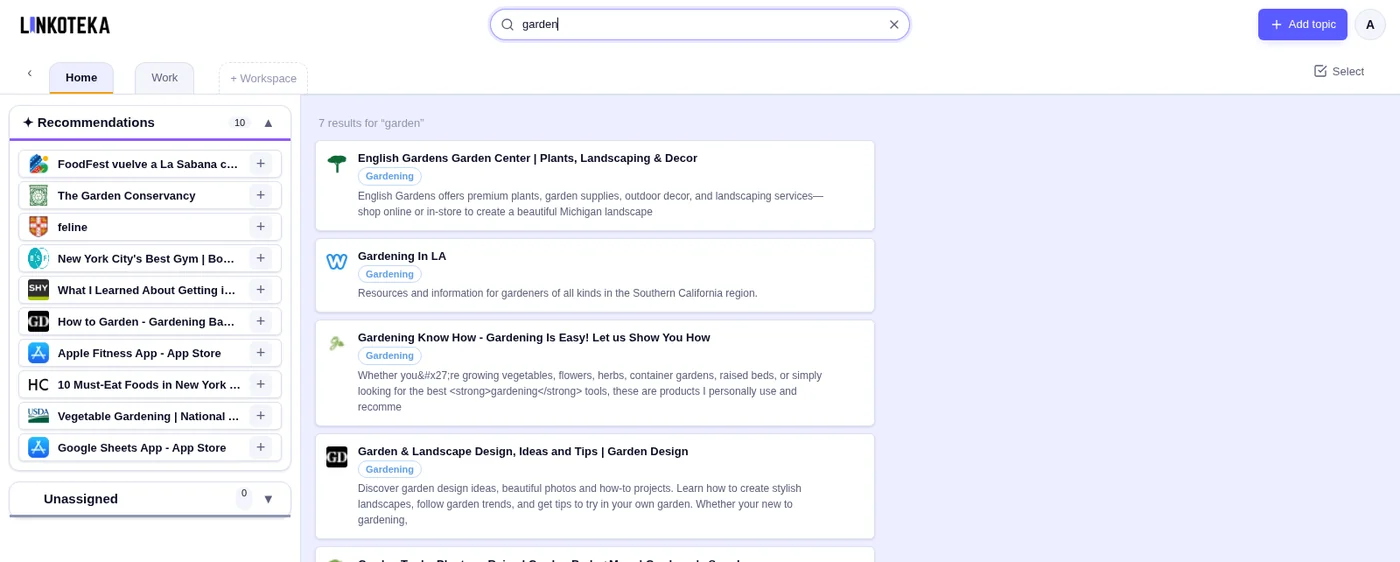
Use the search bar at the top of the app bar to find bookmarks in the workspace you're in (plus your Unassigned tray). Press / anywhere to jump straight to it. Results update as you type. Click × or press Escape to clear the search.
On Free, search matches each bookmark's title, description, tags, and notes. Pro also searches inside the pages you've saved — the full text of the page as it was when we last read it — and shows the matching passage under each result, with your terms highlighted. Pro search understands "quoted phrases", OR, and -excluded words, and accents are optional either way.
Batch Operations
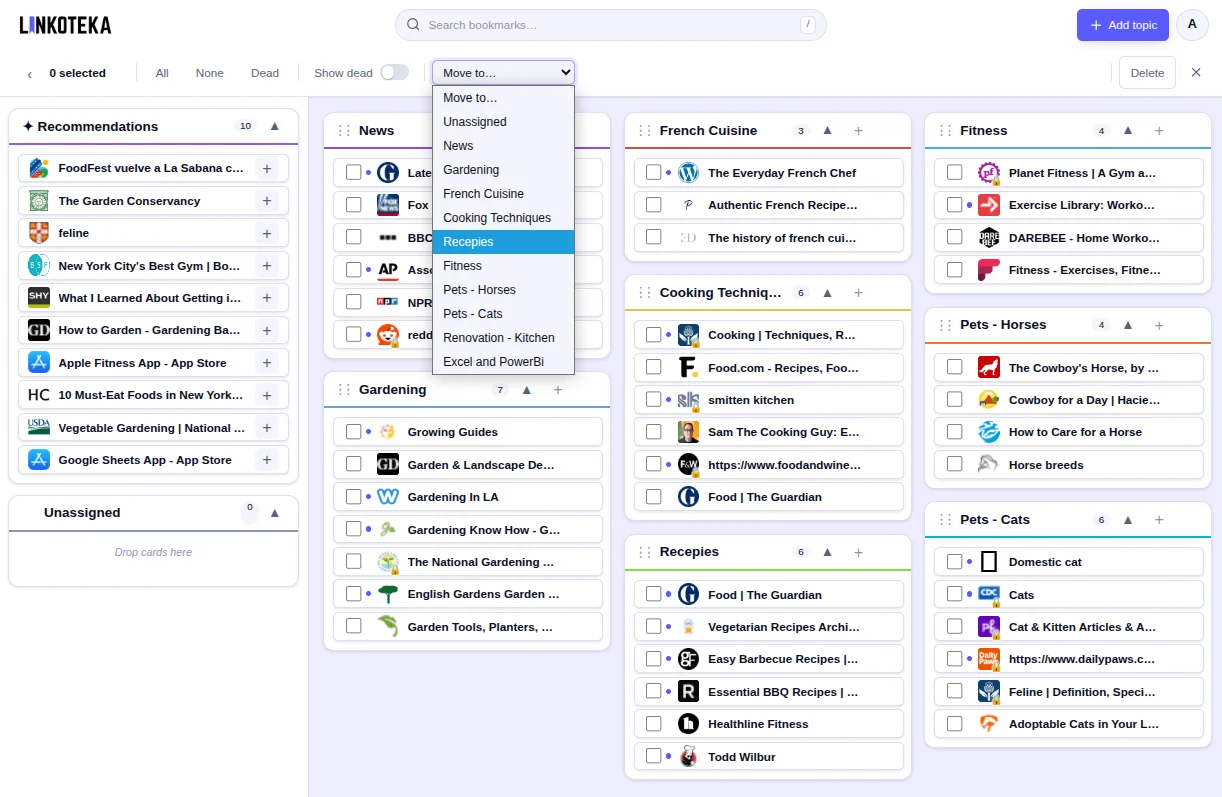
Click Select on the workspace tab row to enter batch mode — the tab row turns into an action bar. Check the bookmarks you want to act on, then pick a topic from Move to… to move them (the move happens as soon as you choose), or click Delete to remove them all at once. There are also shortcuts to select All, None, or just the Dead links, and a Show dead switch. Click ✕ or press Escape to leave batch mode.
Keyboard shortcuts
- / — jump to the search bar
- Escape — close the open dialog or menu; otherwise leave batch mode, or clear the search
- Enter — save, in the topic and workspace dialogs